


NETWOXX Marketplace Buy & Sell
0.00.00 Reviews
App Specs
- Version
- 3.0.4
- Updated On
- License
- Free
- Downloads
- 10,000+
- Developer
- Netwoxx Limited
- Categories
- Shopping
- Platform
- Android
Screenshots
 Analysis by AppCompare
I tend to judge a marketplace app by how quickly I can answer two questions: can I find the right item without fighting the interface, and can I tell whether a listing deserves my attention? NETWOXX Marketplace Buy & Sell is a shopping app from Netwoxx Limited built around local-style classified ads, so its appeal is the chance to browse things people are offering and put your own items up for sale. I’d consider it most useful when I want to explore second-hand options or sell something without turning the task into a project.
What kind of marketplace it is
The classified-ad approach makes this feel different from a conventional online store. A retailer usually presents a consistent catalogue, checkout process, and fulfilment arrangement; a marketplace listing depends much more on the individual seller and the details they provide. That can make browsing feel personal and varied, but it also means I would inspect each item carefully and ask sensible questions before committing. The app is not a substitute for the predictability of buying a new product from a retailer.
For a practical example, imagine I need a replacement desk lamp but am not in a hurry. I can browse listings, compare the descriptions and photos, and decide whether a nearby second-hand option is worth pursuing. If the first promising listing is vague, I can move on rather than assume every ad is equally complete. That small habit matters more in classifieds than it does when choosing between identical products in a standard shop.
Speed expectations and browsing habits
I would approach the app as a place to browse and evaluate listings, not as a promise of instant results. A marketplace’s usefulness depends on what is currently posted and how clearly sellers describe it. If I have a flexible wish list, it makes sense to check more than once and keep track of items that interest me. If I need a specific item immediately, a retailer with known stock and delivery arrangements may be the more reliable choice.
A useful way to keep a search manageable is to decide what matters before scrolling: a firm budget, acceptable condition, and whether collection or distance affects the decision. Then I can compare ads against those criteria rather than being distracted by a low asking price alone. In any classified marketplace, a cheap listing may involve extra travel, missing details, or a condition that does not fit the need; the headline price is only one part of the trade-off.
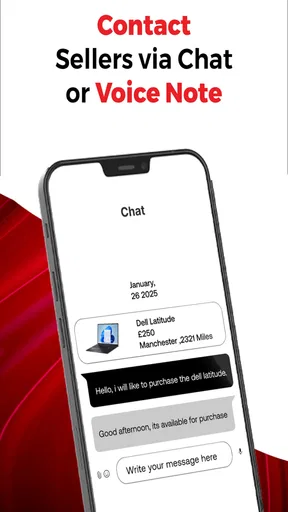
When a listing catches my eye, I would read its description before sending a message and note any unanswered questions. Asking one clear question at a time is more useful than sending a vague “Is this available?” followed by several messages. For example, I might ask about a specific mark, included accessories, or the preferred collection arrangement. This makes the conversation more efficient and helps me judge whether the seller has addressed the detail I actually care about.
When activity gets heavier
Marketplace use can become more demanding when I am comparing several similar items, keeping track of conversations, and preparing listings of my own. I would avoid trying to handle all of that from memory. A short note with the item, asking price, condition, and the question I still need answered can prevent confusion between ads. This is especially useful if several listings look similar or if I am contacting more than one seller.
Worth Reading Before You Choose

Flipboard Shows What News Apps Must Do Beyond the Feed

Switching to Android Auto Means Rethinking Your Driving Routine

Google Calendar Makes a Crowded Week Easier to Manage

Ludo King Makes the Most of the Minutes Between Plans

Baby Panda World Brings Quick Play to Modern Phones, but Its Game Library Feels Busy

ESPN’s Live Game View Makes Following Close Games Easier
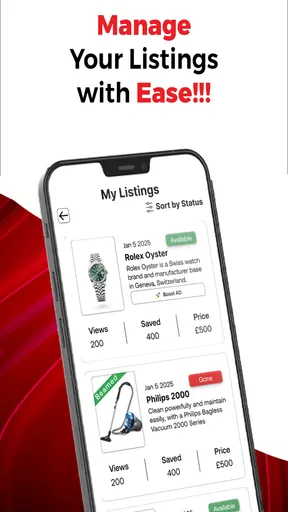
For selling, preparation is likely to matter more than speed. Before creating an ad, I would gather the item’s relevant details and take clear photos in good light, including any wear that could affect a buyer’s decision. A specific description can reduce repeated questions and help the right person decide whether to get in touch. I would also set a price I can explain and decide in advance how much room, if any, I have for negotiation.
There is a practical trade-off here: making a listing attractive takes a little care, but rushing can cost time later. If a buyer has to ask for basic information that could have been included from the start, the conversation becomes longer without making the item easier to assess. I would treat accurate photos and a direct description as part of the selling process, not optional polish.
Reliability, trust, and sensible checks
With person-to-person ads, reliability is not just a question of whether an app opens. It also depends on the quality of listings and communication, which can vary from one user to another. I would not treat a polished photo or confident message as proof that an item is as described. Before agreeing to a purchase, I would clarify condition and what is included, and keep the decision grounded in details rather than urgency.
For a higher-cost item, I would be more cautious than I would be for a low-cost household find. I’d ask for the information needed to judge the item, read the exchange carefully, and avoid agreeing to terms I do not understand. Classified ads can be useful precisely because they connect individual buyers and sellers, but that directness puts more responsibility on me to make a careful decision.
If I am selling, I would likewise keep my own listing and replies clear. Stating condition honestly and answering questions plainly helps prevent mismatched expectations. It is tempting to describe an item in the most flattering possible way, but a buyer who arrives with a different impression is not a successful sale. Good communication is a practical safeguard for both sides, even when a marketplace makes it easy to start a conversation.
Device fit and everyday use
The app is free to install, is rated for Everyone, and its listed minimum operating-system requirement is version 7.0. Its current version is 3.0.4, and it has passed 10K+ installs. Those details make it easier to judge basic compatibility, but they do not tell me how it will feel on every particular phone. On an older or less capable device, I would keep expectations modest when browsing photo-heavy listings and close other demanding apps if the phone is already struggling.
For ordinary use, I would expect the experience to be shaped at least as much by network conditions and the amount of listing detail I am viewing as by the app itself. If images take time to appear, I would check my connection before assuming the marketplace is at fault. If a screen seems to stop responding, I would give it a moment, then return to the listing and check whether the action actually completed before repeating it. That simple recovery habit helps avoid duplicate messages or accidental repeated actions in many shopping apps.
Storage and attention are worth considering too. A marketplace can tempt me to keep browsing long after I have found a suitable option. I get more value from setting a clear purpose—sell a particular item, compare a few candidates, or check whether a wanted object is available—than from scrolling without a limit. That is not a special technical trick; it is a way to keep the app useful rather than letting a long session replace a decision.
Who will get the most from it
I’d recommend a classified marketplace to someone who is comfortable comparing individual listings and communicating with sellers. It can suit people clearing out household items, looking for second-hand alternatives, or browsing without needing the uniform product pages of a large retailer. It is less suitable for anyone who wants a guaranteed stock level, a standardised return process, or an entirely hands-off purchase. In those cases, a conventional shop or a specialist retailer is a better fit.
One everyday selling scenario is clearing space before reorganising a room. I would choose one item, check it over, photograph it from useful angles, and write down its condition and dimensions if those details matter to a buyer. After posting, I would keep an eye on messages and answer specific questions promptly. Breaking the job into those steps makes it easier to manage than photographing a pile of belongings and writing rushed ads all at once.
For a buyer, a useful workflow is to shortlist only a few plausible options, compare their condition and practical details, then contact the strongest candidate with a focused question. If the answer does not resolve an important concern, I can move to another listing. This avoids treating the first available ad as the best one and makes comparisons less dependent on impulse.
Costs and expectations
The app is free, but in-app purchases are listed from $0.49 to $30.99 per item. I would check what a purchase offers and whether I actually need it before spending; the free starting point is a sensible way to explore the marketplace first. A listing’s asking price is separate from the cost of using the app, so I would keep the item budget and any optional in-app spending distinct when deciding whether a purchase makes sense.
I would also go in with realistic expectations about what “convenient” means here. The app can bring classified listings together, but it cannot make every seller responsive or every item suitable. It can help me discover possibilities; I still have to check the details, decide whether the arrangement works, and use good judgement. That balance is the main difference between browsing a community marketplace and placing an order with a retailer.
First Impressions
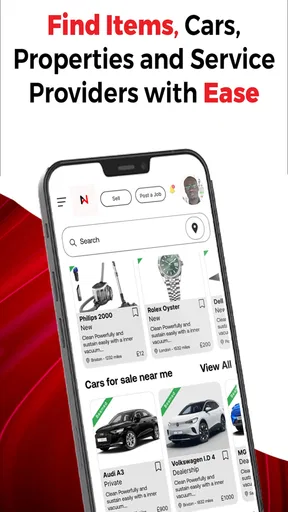
When I first opened NETWOXX Marketplace Buy & Sell, I was greeted with a sleek and intuitive interface. No flashy distractions here—just a clean, user-friendly design that makes navigation a breeze. You know that feeling when an app just "gets" you? This one does.
Signing up was straightforward. Within minutes, I was browsing through a plethora of categories, each filled with items ranging from electronics to vintage collectibles. It's like having a virtual flea market at your fingertips, minus the crowds.
Browsing and Buying
The search functionality is robust. You can filter by price range, location, and even condition of the item. I appreciated the detailed descriptions and multiple photos sellers can upload. It’s almost like window shopping but in the comfort of your home. And yes, there’s an option to "heart" your favorite items, so you can come back to them later.
Making a purchase is as easy as pie. With a couple of taps, I was able to negotiate with sellers through the in-app messaging system. It’s fast, efficient, and keeps everything in one place. Payment options are secure, and I felt confident knowing my transactions were protected.
Selling Made Simple
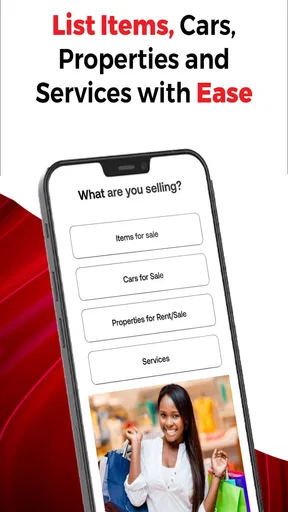
If you're looking to declutter, selling on NETWOXX is a breeze. Listing an item takes no time at all. Just snap some pics, write a catchy description, and set your price. The app guides you through each step, ensuring your listing looks professional. I put up a few items, and they started attracting interest pretty quickly.
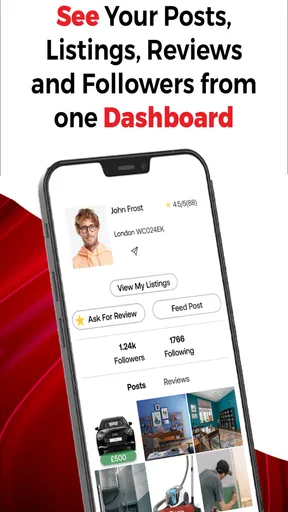
There's also a rating system for sellers that builds trust within the community. The higher your rating, the more likely you are to attract buyers. It’s a win-win for everyone involved.
Community and Support
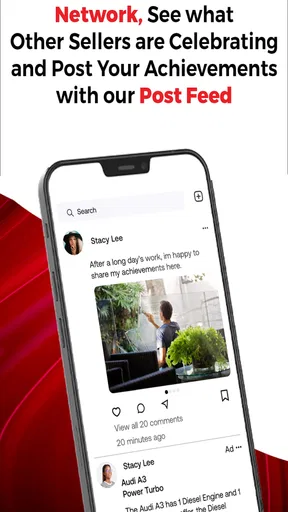
One of the standout features is the community aspect. NETWOXX isn’t just about buying and selling; it’s about connecting with people who share your interests. There are forums and groups where you can chat with fellow enthusiasts, share tips, and even organize meet-ups.
Customer support is top-notch. I had a minor issue with a transaction, and the support team was quick to respond and resolve it. It’s nice to know they’ve got your back.
Wrapping Up
All in all, NETWOXX Marketplace Buy & Sell is a refreshing addition to the online marketplace scene. It's user-friendly, community-focused, and offers a seamless experience for both buyers and sellers. If you're tired of the usual suspects and want something reliable and easy to use, give NETWOXX a try. You might just find your new favorite marketplace.
Ready to dive into the world of convenient buying and selling? Download the app and start exploring!
Pros
- User-friendly interface for easy navigation.
- Wide range of categories to explore.
- Secure payment options available.
- Efficient customer support service.
- Customizable notification settings.
Cons
- Limited international shipping options.
- Occasional app crashes reported.
- Some listings lack detailed descriptions.
- High seller fees compared to competitors.
- No built-in chat for buyer-seller communication.
FAQs for NETWOXX Marketplace Buy & Sell
What is NETWOXX Marketplace Buy & Sell?
NETWOXX Marketplace Buy & Sell is a mobile application available for both Android and iOS devices that allows users to buy and sell products in a secure and user-friendly environment. It connects local buyers and sellers, offering a wide range of categories from electronics to home goods. The app is designed to streamline the process of listing and purchasing items, providing a convenient platform for commerce.
How do I list an item for sale on NETWOXX Marketplace?
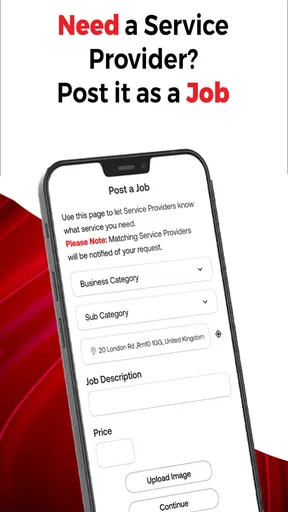
Listing an item on NETWOXX Marketplace is a straightforward process. After downloading and installing the app, users can create an account or log in. To list an item, simply navigate to the 'Sell' section, upload clear photos, write a detailed description, and set your price. The app provides easy-to-follow prompts to ensure your listing reaches potential buyers effectively.
Is buying and selling on NETWOXX Marketplace safe?
Yes, NETWOXX Marketplace is designed with user safety in mind. The app includes features like user verification, secure messaging, and optional payment protection to enhance security. Additionally, it encourages users to meet in safe, public locations for exchanges and offers tips on maintaining personal safety during transactions.
Are there any fees associated with using NETWOXX Marketplace?
NETWOXX Marketplace is free to download and use for basic buying and selling. However, there might be optional fees for premium features such as boosting a listing for greater visibility or utilizing secure payment options. These features are designed to enhance the user experience and provide additional value for sellers and buyers.
Can I use NETWOXX Marketplace in my country?
NETWOXX Marketplace is available in multiple countries, supporting a wide range of regions. However, availability may vary depending on local regulations and market presence. It is advisable to check the app’s availability in your app store and review any region-specific terms of service when signing up.


